Mycelium v2: measuring efficiency of edge-peripheral
Evaluating the efficiency of our hardware and firmware
In our previous post about firmware, we’ve gone through the firmware of Mycelium v2’s edge-peripheral device - a battery-powered ESP32 sensor node capable of measuring environmental conditions. Now it’s time to evaluate the efficiency of the hardware and firmware.
Evaluating our hypothesis
- We are using ESP32 deep sleep. Deep sleep is a power-saving mode where the microcontroller shuts down almost all of its components—the CPU stops executing code, RAM is powered down, and most peripherals are disabled. Only a small portion of the system remains active to wake the device up at predetermined intervals.
- Additionally, using BLE instead of WiFi provides significant power savings according to this sheet.
- We implemented a custom deviation-based time series compression library directly in the firmware
- We’ve tweaked the boot up code, during
Bufferingit only starts the I2C bus while in theAwaitingTimeSyncandFlushingstates it also bootstraps the BLE radio which would consume more energy. Next to this, in theBufferingstate the processor is a running at a lower frequency which sould save some power.
How to evaluate this ?
We are using a Nordic Power Profiler Kit 2 for evaluating what the power usage is of the PCB and it’s firmware. It helps you see exactly how much current your device draws — moment by moment — across a wide range of operating modes (sleep, transmit, receive, CPU active, etc.). This device is used instead of batteries to supply power, so we can supply the power but also watch how much power it does draw.

The software we use to see the measurements is nRF Connect for Desktop. It features multiple tools which are quite useful for embedded development.
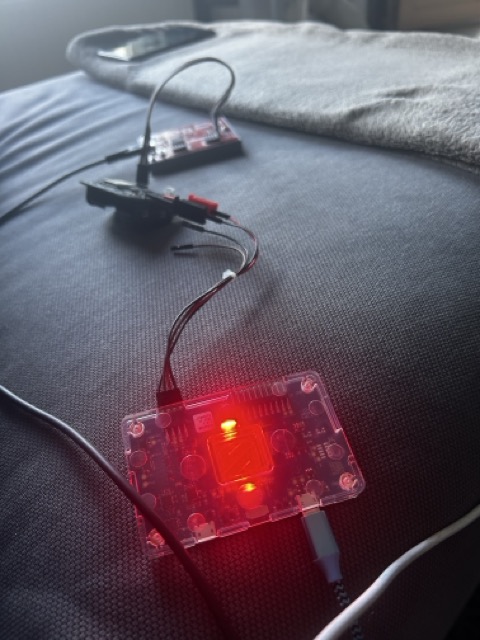
First measurement
Once we setup all the settings (voltage, sampling rate, etc) in the nRF Connect application we can finally start measuring. I’ve adjusted firmware to deep sleep every 60 seconds instead 10 minutes to get a shorter feedback loop.
- Down below you see a screenshot where
AwaitingTimeSyncalready happend - You see however clearly 6 times a peak which means it’s measuring in the
Bufferingstate which consume less power than the 7th spike. This means our deviation based buffer is full and it transitions toFlushing - In the
Flushingstate, the CPU clock is set higher and more importantly it bootstraps the BLE radio to transmit the measurements.
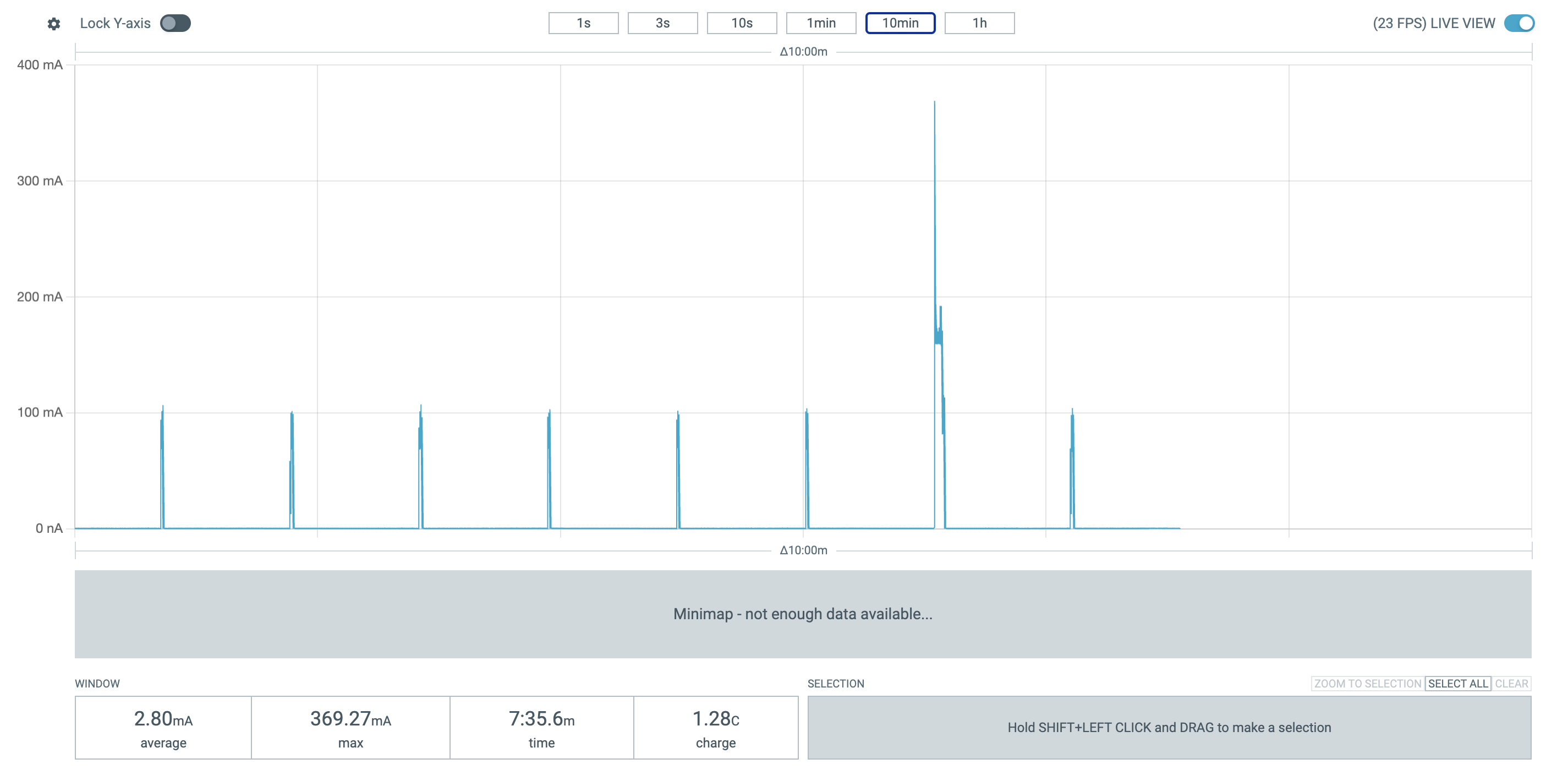
✅ This means our deviation based compression and state machine works!
Deep sleep power usage
When we start to zoom in to in between the peaks we can clearly see it goes to deep sleep. It barely uses energy: ~250 uA
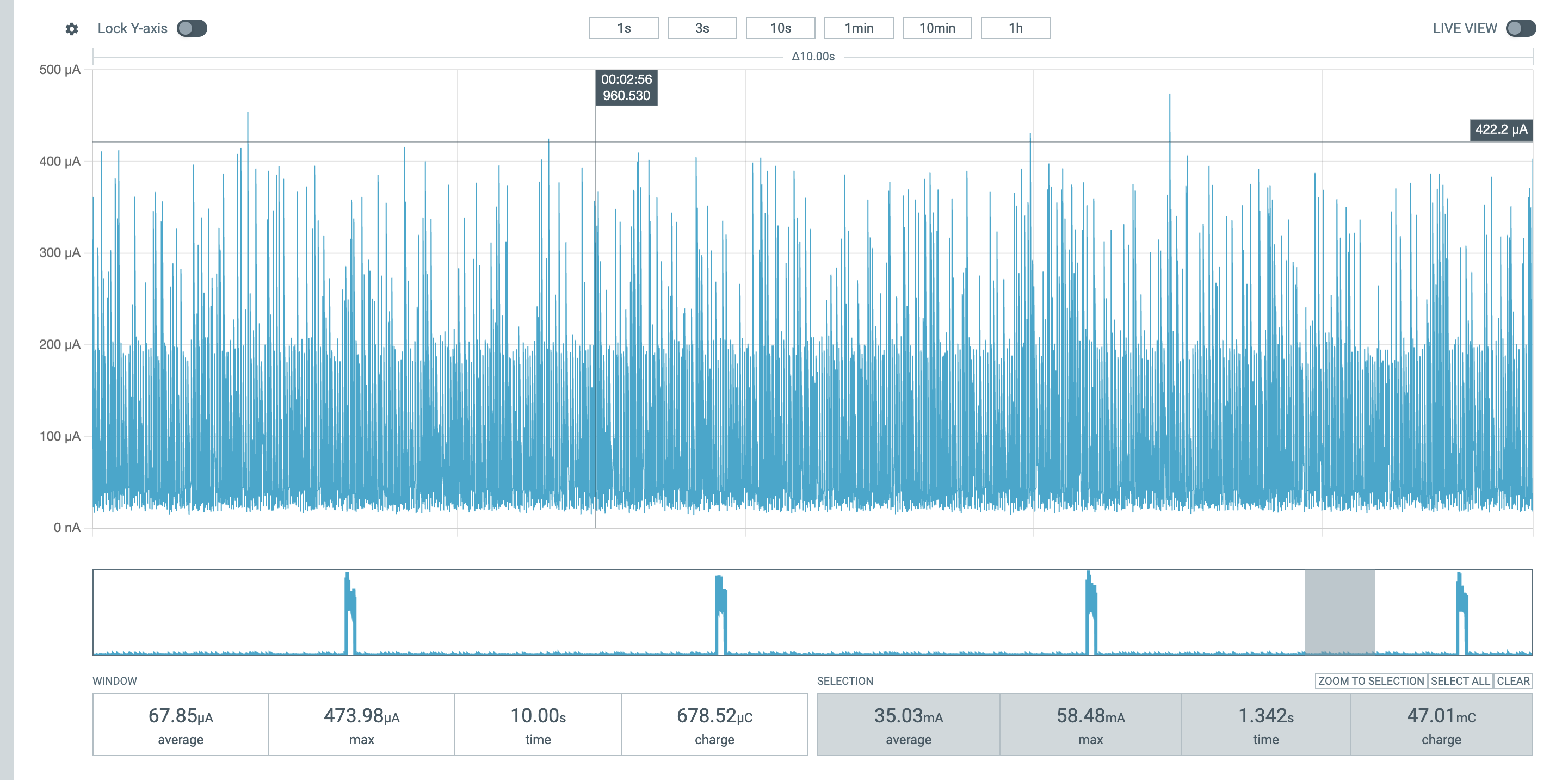
✅ Our deep sleep also works, nice!
Tweaking the CPU clock while Buffering
In the Buffering state we only use the I2C devices and nothing else. This doesn’t need a lot CPU power, but by default ESP32 boots with a max CPU frequency.
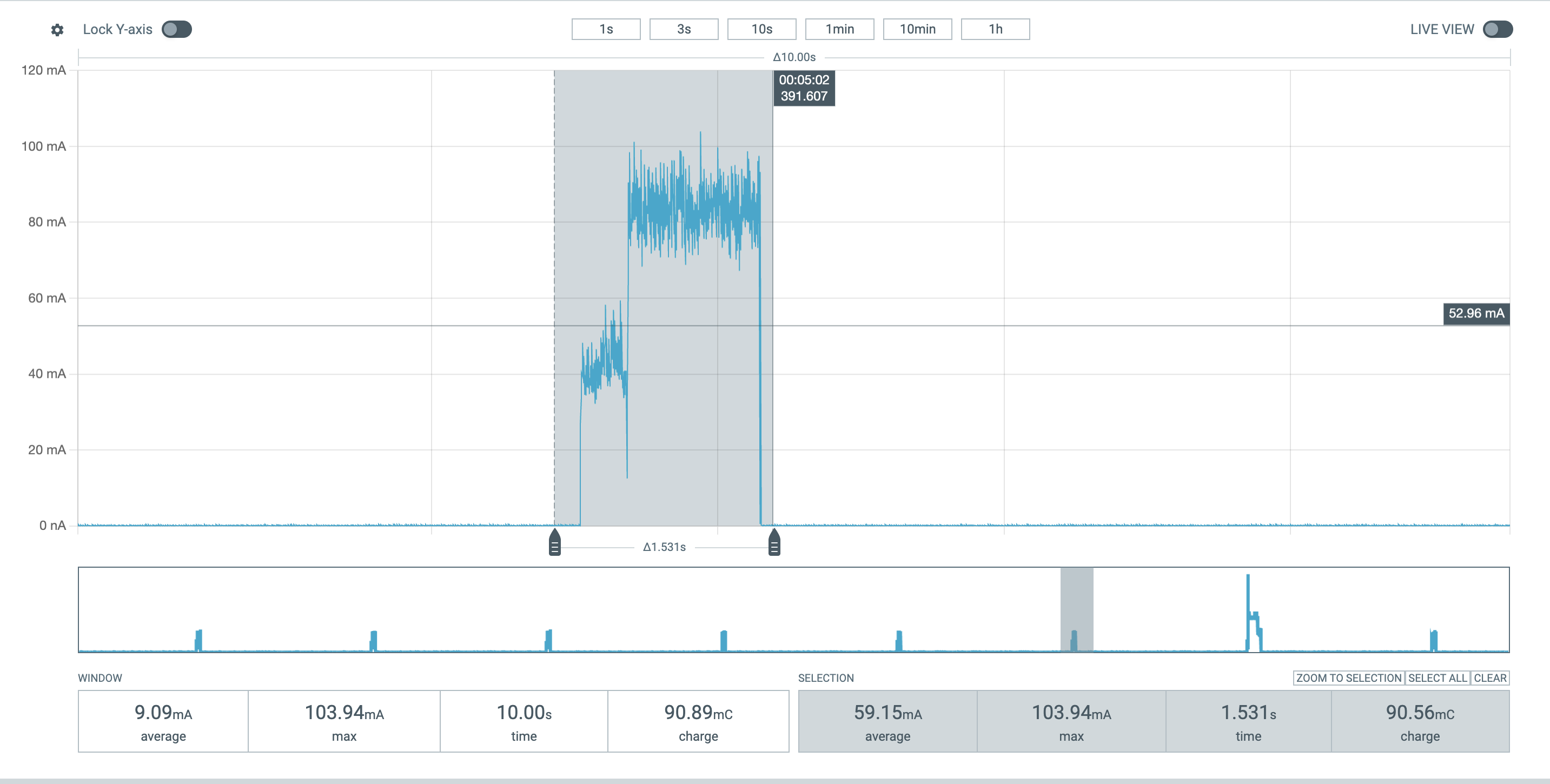
In our first untweaked setup we use 59mA
To tweak this, we can alter the bootstrapping code to
let cpu_clock = match state {
    DeviceState::AwaitingTimeSync | DeviceState::Flush(_) => CpuClock::max(),
    DeviceState::Buffering(_) => CpuClock::_80MHz,
};
let config = esp_hal::Config::default().with_cpu_clock(cpu_clock);
let mut peripherals: Peripherals = esp_hal::init(config);
So now while Buffering the CPU clock set is to 80Mhz instead of the CPU clock max. If we measure again we can see the difference
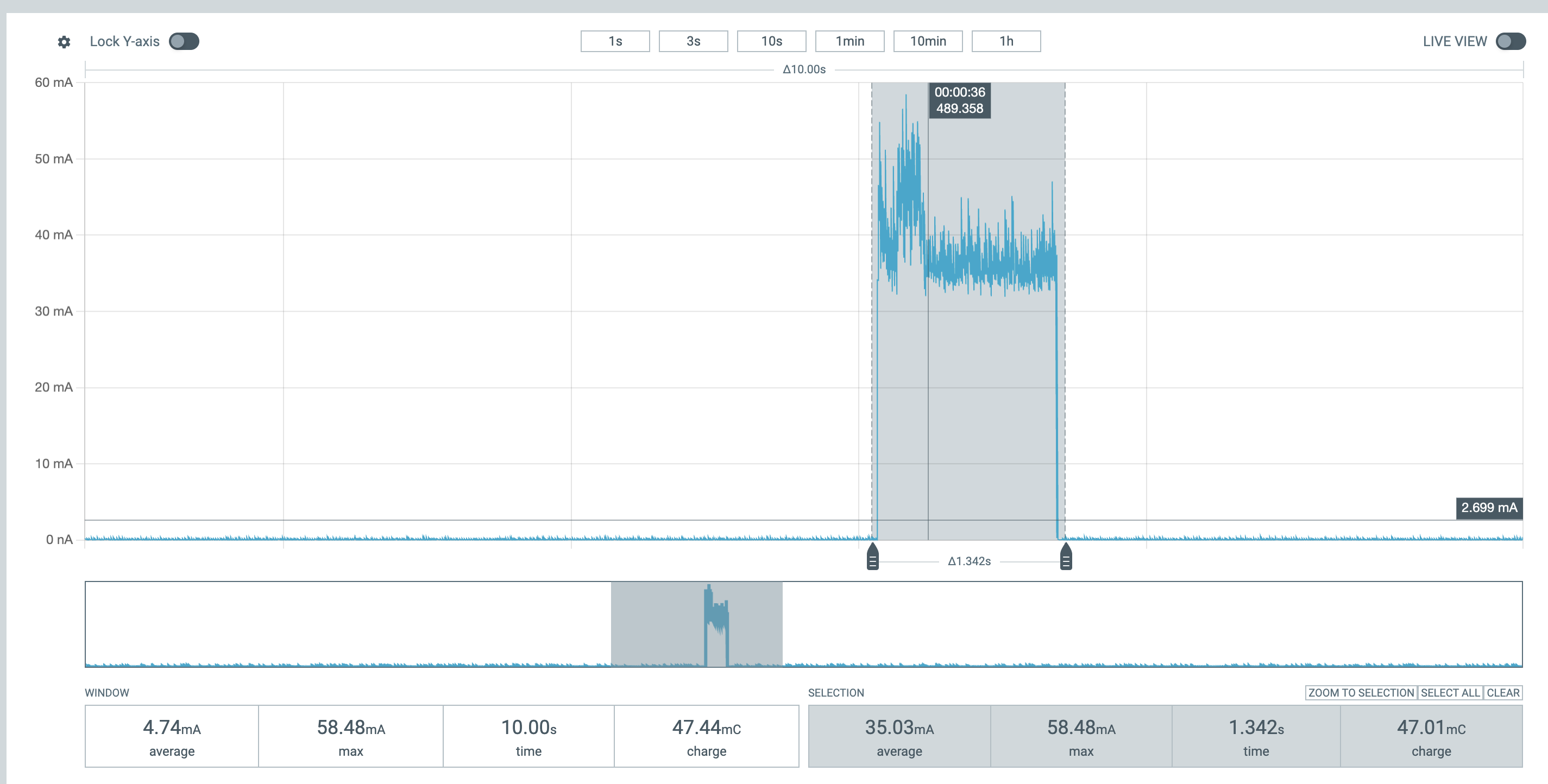
✅ Now with the tweaked code we use 35mA! This will significantly add up if we measure every 10 minutes for months
Evaluating power usage of Flushing
In the Flushing states the following things will happen
- Bootstrapping of BLE and I2C
- Bring up the BLE peripheral and wait for central to synchronize
- Measure with I2C, transition to
Bufferingand go to deep sleep again
If we look at the power sample we can clearly the power patterns which correlate with the code
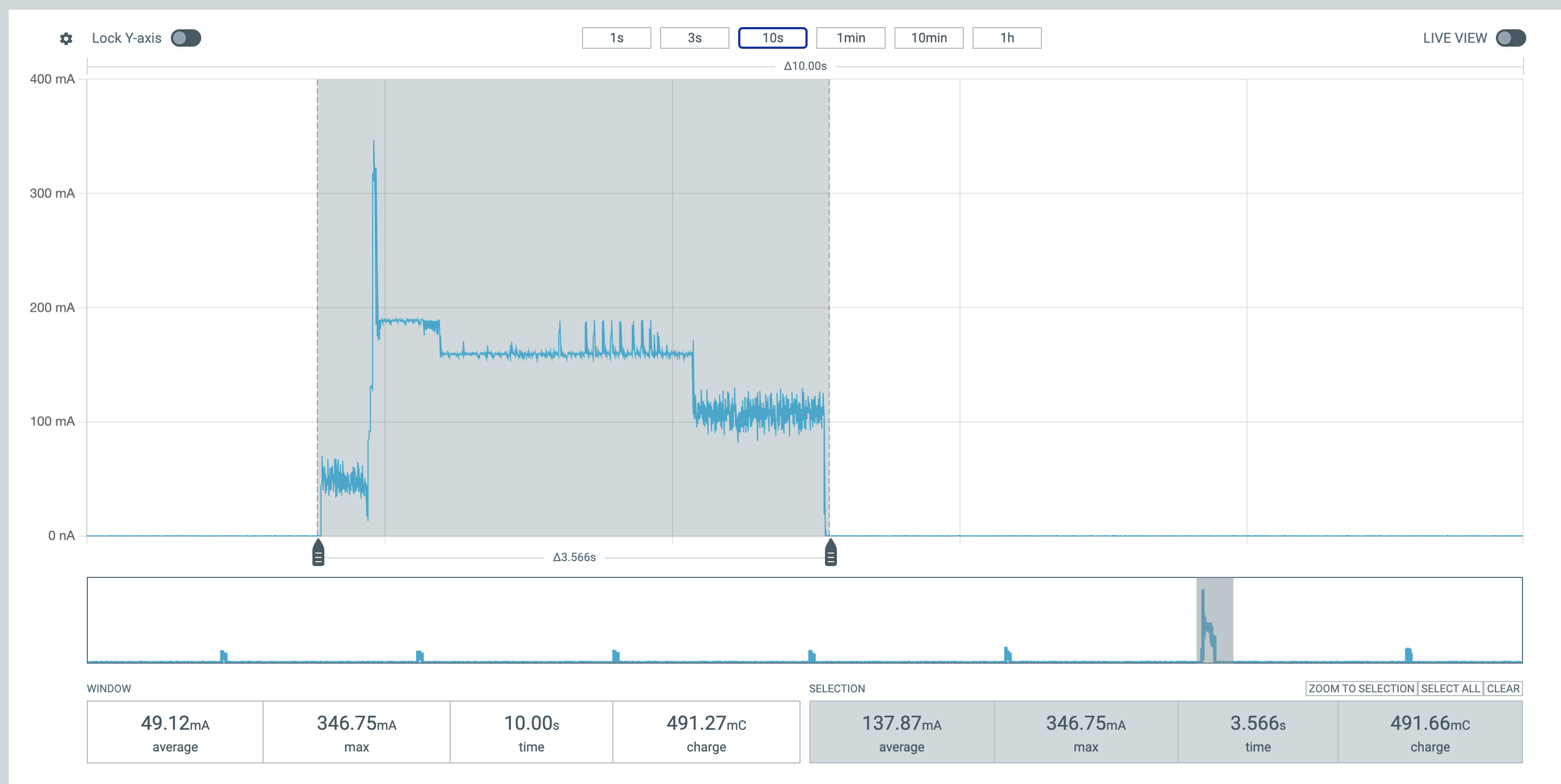
- It starts off with bootstrapping which fairly low on power usage: < 100 mA
- The biggest peak is when BLE goes online ~300 mA
- After that it advertises and is online for a bit ~180 mA
- When transmiting you see some small peaks close to 200 mA
- The BLE goes offline and the power usage drops significantly to about slightly above 100 mA, which is when the device is measuring with I2c
✅ It clearly shows the correlation between our code and power usage
❌ While the ESP32 spec said BLE should typically use 95mA-100mA it uses about 150-200 mA which we assume it’s what it is, but it’s hard to tell how Espressif tested this ?
Conclusion
Through these measurements we’ve confirmed that Mycelium v2’s edge-peripheral performs efficiently and that our firmware optimizations have a measurable impact on power consumption. Deep sleep successfully reduces idle current to around 250 uA, and dynamically adjusting the CPU frequency during the Buffering state cuts active power draw from 59 mA to 35 mA — a significant improvement for a device expected to run for months on battery power.
The state-pattern and deviation-based compression both behave as intended, and the power profiles align closely with the designed firmware states. While BLE transmission consumes slightly more current than expected (up to ~200 mA vs. the 95–100 mA stated in the datasheet), the overall system still demonstrates strong energy efficiency and predictable behavior.
These findings validate our approach to balancing performance, reliability, and battery longevity in a compact sensor node.
In the next post, we’ll shift our focus to the central device — the hub responsible for collecting the measurements from multiple edge-peripherals and transmitting them to the backend — completing the data pipeline from sensor to cloud.
📚 Posts in this series: Mycelium v2
- 1 Introducing Mycelium v2: A smarter way to water and monitor plants
- 2 CI/CD Pipelines: Choosing the Right Tool
- 3 Mycelium v2: building the edge-peripheral device
- 4 Mycelium v2: firmware for the edge-peripheral device
- 5 Mycelium v2: measuring efficiency of edge-peripheral (current)