CI/CD Pipelines: Choosing the Right Tool
A comprehensive comparison of CI/CD tools including GitHub Actions, Dagger, Bazel, and Earthly
Why continuous integration and delivery?
When you start a new project it’s important to set-up a good foundation to build and test new functionality. This is a key component of moving work between silos (as referred to in The Phoenix Project). If you can build, test and release your software in automated way it’s easy to verify if it works correctly and have it move to the next silo: developers/product owners/QA/ops/AI agents/code analysis and other teams to verify if the new changes work, hence continuously integrate.
- Faster feedback loops - developers get quick confirmation if their new code breaks something
- Consistency & Reliability - manual builds and remembering commands is error prone
- Scalability - as the project grows.. manual testing doesn’t scale
- Faster time to market - ensure “what worked on my machine” also works in production and CI/CD
- Fewer bugs and production issues - less firefighting, fewer outages, etc
Technical (non-functional) requirements
- Need tracing & caching - Building and testing software can be technical resource intensive and can become slow. By using tracing you can identify what parts of the build are slow. Applying caching makes the build faster. If you don’t rebuild things which haven’t changed you can save significant amounts of time
- Local testing and a composable/expressive build runtime - Setting up a build can be a tedious tasks, it usually requires you to program in YAML. YAML is not a programming language, it does not feature conditionals, loops, functions and composition. The runtime is typically at the build server where you send the instructions to build system in YAML, to verify if the build script is working it can take you 5-15 minutes of your time. Hence maintaining and getting up and running is a tedious task
- Simple enough - Build systems can become projects and studies on their own. For examples Bazel, which is an exceptionally good at building but typically requires a engineering team to take care of all the nuts and bolts to make it work in a enterprise setup. This project where we don’t have the time for that.
- Polyglot tool - Project mycelium uses different programming languages: Rust, TypeScript and Scala. All these programming languages have their own ecosystems and build systems. Re-using these build systems, but use the outputs and add some degree of caching would be very helpful! Hence we need a polyglot build tool.
The options
| Tool | Pros / Benefits | Cons / Challenges | Notes / Fit for Project |
|---|---|---|---|
| GitHub Actions | - Native to GitHub - Easy setup with prebuilt actions - Supports caching, matrix builds, and secrets | - YAML-based, limited programming features - Large pipelines can become hard to maintain | Good for small-to-medium projects, fast setup and has lots of plugins |
| GitLab | - Full DevOps platform - Built-in runners, caching, artifact storage - Supports local testing via Docker | - YAML-based pipelines - Can get complex for large projects | Good for projects already on GitLab, scalable, enterprise-ready |
| Dagger | - Composable, programmable pipelines - Portable builds across dev & CI - Full caching & tracing support | - Less mature ecosystem - Requires programming (TypeScript/Python/Go) - Requires Docker runtime | Ideal if you want fully programmable pipelines and local verification |
| Bazel | - Advanced caching & build graph - Extremely fast for large projects | - High setup & maintenance overhead - Steep learning curve, requires engineering team | Excellent for large, complex projects; probably overkill for small/short-term projects |
| Jenkins | - Highly customizable - Large plugin ecosystem | - Maintenance heavy - UI & YAML pipelines can get messy | Good if you need custom workflows and self-hosted solution |
| Earthly | - Repeatable builds with container isolation - Simple syntax (Dockerfile-like) - Supports local testing and CI integration | - Requires Docker runtime - Still evolving; may have a learning curve for new users | Reproducible builds and local CI parity |
The chosen option for mycelium
After evaluating several CI/CD tools for our project, we selected Dagger as the best fit. While other tools have their merits, they each presented limitations for our specific needs:
-
Bazel: While powerful and fast for large projects, Bazel is complex to set up and maintain. It requires a dedicated engineering team to manage its configuration and integration, which is not feasible for our timeline and resources. Bazel shines though on large multi-module projects which are based on the same set of dependencies. For example a big Java codebase which uses Spring Boot for all the backends. When upgrading a dependency it will only rebuild the affected services. While project Mycelium is more contained to a few services which don’t have a shared set of external dependencies this isn’t that important.
-
GitHub Actions, GitLab CI/CD, CircleCI: These tools are primarily YAML-based. While YAML pipelines can work well for simple tasks, they lack programming constructs like loops, functions, and composition. This makes creating complex, reusable, and maintainable pipelines difficult.
-
Jenkins: Jenkins offers extensive customization through plugins, but it is outdated, maintenance-heavy, and can become cumbersome over time. Setting up Jenkins for a modern, scalable CI/CD workflow is often more effort than it’s worth.
-
Earthly: Earthly is appealing with its caching of Docker layers and repeatable builds. However, it lacks a fully-fledged programming language for defining pipelines. This limits flexibility when building complex, dynamic workflows.
Dagger, on the other hand, combines the best of both worlds:
- Fully programmable pipelines using TypeScript, Python, or Go, enabling loops, conditionals, functions, and reusable components.
- Built-in caching and tracing to speed up builds and identify bottlenecks.
- Portable and composable pipelines that work both locally and in CI/CD environments.
- Easy to integrate with existing build tools and deployment systems.
This combination of expressiveness, speed, and portability makes Dagger the ideal choice for our project, allowing us to create robust, maintainable pipelines without the overhead of managing overly complex or restrictive systems.
How does it look?
The skeleton
import {
  argument,
  Container,
  Directory,
  dag,
  func,
  object,
  Secret,
  File,
} from "@dagger.io/dagger";

@object()
export class MyceliumBuild {
  source: Directory;

  constructor(@argument({ defaultPath: "." }) source: Directory) {
    this.source = source;
  }
}
This Dagger-based script defines a MyceliumBuild class to automate building and testing the Mycelium project.
Next is the backend Container
containerBackend(): Container {
  return dag
    .container()
    .from("sbtscala/scala-sbt:eclipse-temurin-alpine-21.0.7_6_1.11.3_2.13.16")
    .withMountedCache("/root/.sbt", dag.cacheVolume("sbt-cache"))
    .withMountedCache("/root/.ivy2", dag.cacheVolume("ivy2-cache"))
    .withMountedCache("/root/.cache/coursier", dag.cacheVolume("scala-coursier-cache"))
    .withDirectory(
      "/workspace",
      this.source
        .directory("backend")
        .filter({ include: ["project/**", "src/**", "build.sbt"] })
    )
    .withWorkdir("/workspace");
}
Here dag is imported and provide access to to the Dagger runtime. If you take a look at the code you’ll see it closely resembles a Dockerfile, but in a programming language! This means you can add parameters to make this component reusable.

CAUTION
this.source.directory("backend") with a filter applied. This filter only includes files which are susceptible to changes and will impact the caching mechanism. If none of these files changed, it won’t do a rebuild of that layer.
Next we can re-use this function to build and generate a OpenAPI file from it
@func()
async buildBackend(): Promise<string> {
  return this.containerBackend().withExec(["sbt", "compile"]).stdout();
}

@func()
createOpenAPI(): File {
  return this.containerBackend()
    .withExec(["sbt", "runMain co.mycelium.OpenApiGenerator"])
    .file("openapi.json");
}
These two functions are pretty simple. The buildBackend function builds the backend by compiling it, but you can also run sbt test. The createOpenAPI is more interesting to use in our case for the central component and frontend.

INFO
The central component in the mycelium project will scan for Bluetooth Low Energy devices (BLE). After it found our built peripherals it will read measurements and send them to the backend, hence it needs client to communicate with the backend.
To generate a client for the backend we can use the OpenAPI generator docker container like software
@func()
createClient(generator: string, name: string): Directory {

  const openapi = this.createOpenAPI();
  const generated = dag.container().from("openapitools/openapi-generator-cli:v7.14.0")
    .withFile("/tmp/openapi.json", openapi)
    .withExec(["mkdir", "-p", "/out"])
    .withExec([
      "/usr/local/bin/docker-entrypoint.sh", "generate",
        "-i", "/tmp/openapi.json",     // input file
        "-g", generator,
        "-o", "/out"             // output directory inside container
    ]);

  return generated.directory("/out");
}
This is awesome! We’ve created a function which uses the OpenAPI export of the backend component and allows use to export clients in several languages like Rust or TypeScript
`dagger -c 'create-client rust edge-client-backend | export edge-client-backend'`This will call the createClient function and use the arguments to output a Directory. This is piped to export which will store the directory locally.
This can be put in a sequence to build the central component or a frontend/app component
To see how the build is performing you can open a tracing web terminal like seen here. This can also be used in CI/CD environments
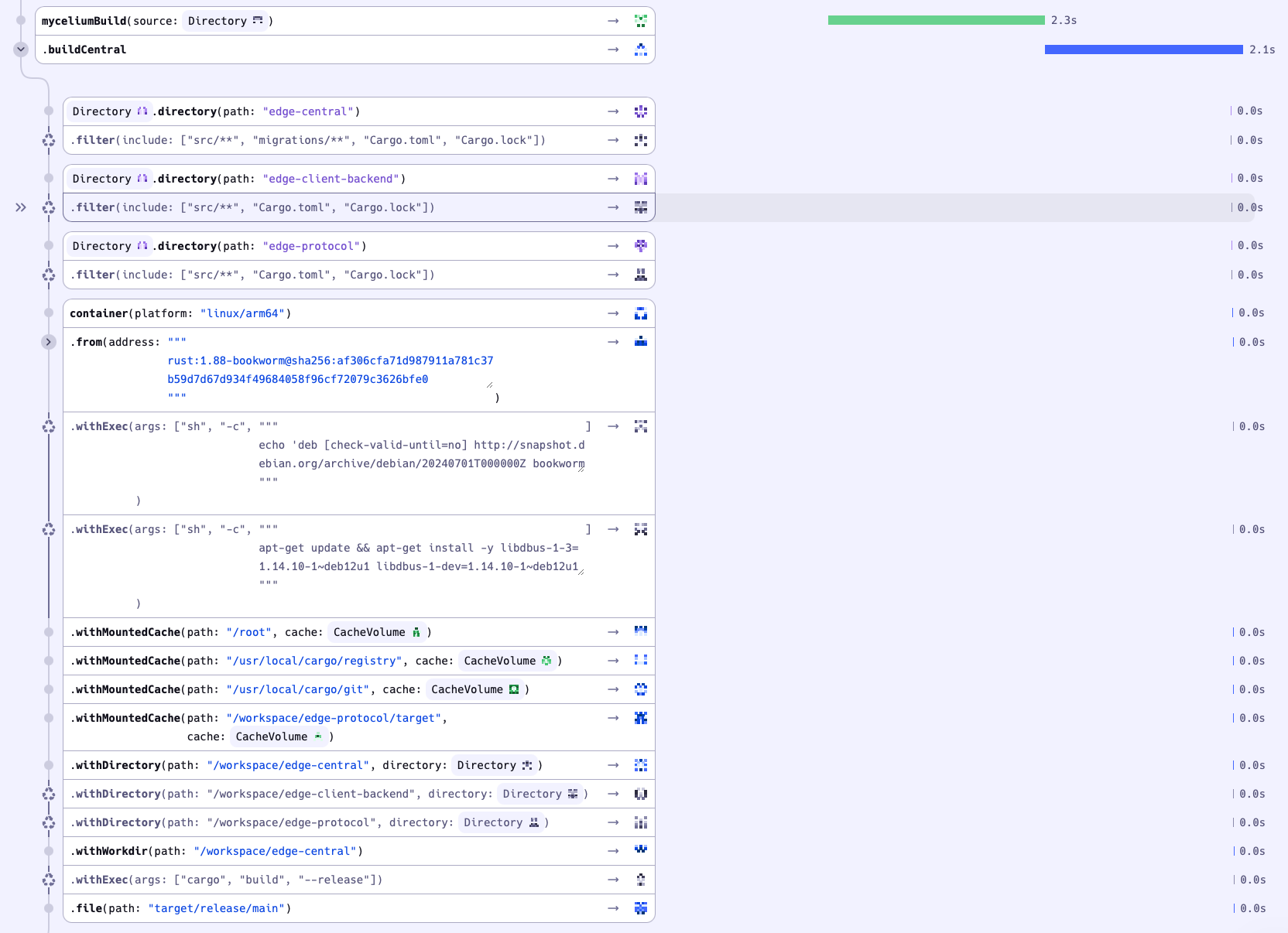
This can be used to view what parts of the build are slow, in this case the build used cache and was finished in a few seconds!
Conclusion
Dagger is a very promising piece of technology for building programmable, composable pipelines. It offers powerful features like caching, tracing, and portability, while letting you define pipelines in real programming languages instead of YAML. That said, the surrounding ecosystem — the “Daggerverse” — is still young. Setting up caching for hobby projects can require either a self-hosted Kubernetes setup or a paid service like Depot. For enterprise adoption, it might be slightly too early given the maturity of the tooling and ecosystem. Still, Dagger shows strong potential and is worth keeping a close eye on as it continues to evolve.
📚 Posts in this series: Mycelium v2
- 1 Introducing Mycelium v2: A smarter way to water and monitor plants
- 2 CI/CD Pipelines: Choosing the Right Tool (current)
- 3 Mycelium v2: building the edge-peripheral device
- 4 Mycelium v2: firmware for the edge-peripheral device
- 5 Mycelium v2: measuring efficiency of edge-peripheral